 LongTake

How to auto-split video recording on iPhone
LongTake is an auto-split video recorder for iPhone and iPad. Choose a time preset from 1 minute to 1 hour, or a file-size preset of 1, 2 or 4 GB. Press record once, and LongTake saves the take in separate playable parts as you record.
Set it up in LongTake
- Open LongTake and choose VIDEO.
- Tap the scissors at the top of the screen.
- Pick 5m, 10m, 30m or 1h. Tap ··· for all the choices: 1, 3, 5, 10, 15 or 30 minutes, 1 hour, or 1 GB, 2 GB and 4 GB.
- Press record. The scissors count down to the next file.
The same choices include Stop after (30 minutes to 8 hours) and Stop at total size (500 MB to 100 GB), so a take you forget about ends by itself. Auto-split and stop rules are free. 1080p and 4K need LongTake Pro.
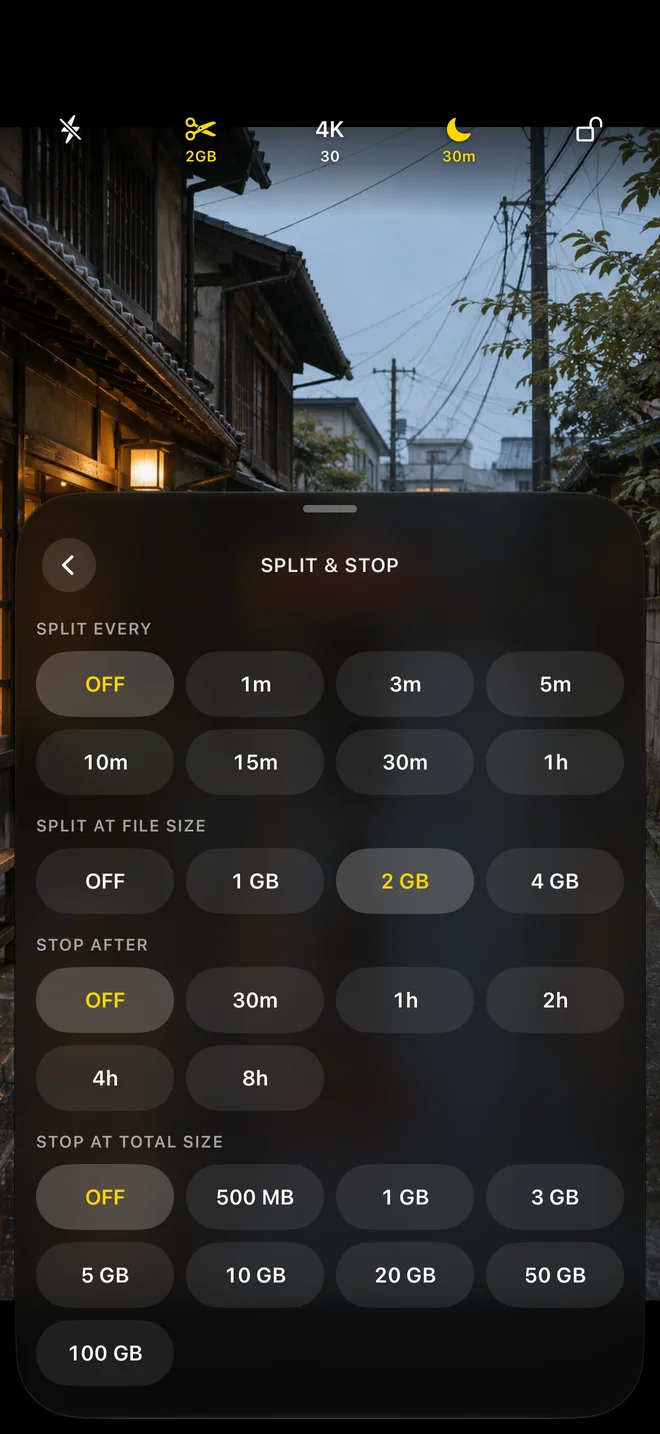
Every available split preset
| Rule | Choices in LongTake | What happens |
|---|---|---|
| Split every | Off, 1, 3, 5, 10, 15 or 30 minutes, or 1 hour | The next part starts when the current part reaches that duration |
| Split at size | Off, 1 GB, 2 GB or 4 GB | The next part starts near that file size |
| Time and size together | Any time preset plus any size preset | Whichever limit is reached first starts the next part |
For example, set 10m for a two-hour lecture to get about 12 files, or 1m to try short segments before a longer event. Use 2 GB when the size of each file matters more than its duration. The last part can be shorter or smaller when you stop recording.
These are presets, not arbitrary values: you cannot enter a custom 100 MB or 500 MB split size. Stop at total size → 500 MB ends the whole recording; it does not start another part.
What you get
- Separate, complete files. Each part closes as a normal video file you can play, share or edit on its own. You don't need the other parts to open it.
- Numbered in order. While you record, the screen shows the part you're on and when the next one starts, such as "Part 2 · next file in 3:36".
- Kept together. Parts of the same take stay together in LongTake's library, where you can review them, export them to Photos or share them.
- On your drive, if you chose one. With external recording (Pro), the parts are written to the folder you picked on the drive.
- Safer long takes. If something ends the take early, every part that already finished is kept. See why iPhone recordings stop.
How many parts, and how big
These are estimates from typical HEVC file sizes: about 2.4 GB an hour at 720p, 3.6 GB at 1080p and 10 GB at 4K 30 fps. Real files are bigger or smaller depending on the scene, so treat them as a guide, not a promise. Where these numbers come from.
Splitting by time, for a two-hour recording:
| Split every | Parts in 2 hours | Each part at 720p | 1080p 30 fps | 4K 30 fps |
|---|---|---|---|---|
| 5 minutes | 24 | About 200 MB | About 300 MB | About 850 MB |
| 10 minutes | 12 | About 400 MB | About 600 MB | About 1.7 GB |
| 15 minutes | 8 | About 600 MB | About 900 MB | About 2.5 GB |
| 30 minutes | 4 | About 1.2 GB | About 1.8 GB | About 5 GB |
| 1 hour | 2 | About 2.4 GB | About 3.6 GB | About 10 GB |
Splitting by size, roughly how long each part lasts:
| Split at | 720p | 1080p 30 fps | 4K 30 fps |
|---|---|---|---|
| 1 GB | About 25 minutes | About 17 minutes | About 6 minutes |
| 2 GB | About 50 minutes | About 34 minutes | About 12 minutes |
| 4 GB | About 100 minutes | About 68 minutes | About 24 minutes |
Size limits are approximate. A part can run slightly over while it closes.
Time, size or both?
| Split by | Best when | Try |
|---|---|---|
| Time | You want even chunks you can find by the clock: classes, games, interviews | 10 or 15 minutes |
| File size | Files must fit a limit: an upload form, a messaging app, a FAT32 drive | 2 GB, or 1 GB if the limit is strict |
| Both | You want to limit the duration and approximate size of each part. The first limit reached starts the next file | 30 minutes and 4 GB |
An example of both: at 4K 30 fps, a 30-minute part would be about 5 GB, so with a 4 GB limit as well, LongTake starts a new file roughly every 24 minutes instead. At 1080p the 30-minute limit is reached first. To choose a size for a particular service, see what size to split a video at.
Other names for the same thing
People describe this in different ways: segmented recording, recording in chunks or segments, "a new file every 10 minutes", or auto-split. They all mean the same thing here: the camera closes one file and opens the next while the take carries on. It is not loop recording, which deletes the oldest piece to make room; LongTake keeps every part. Loop vs segmented recording explains the difference.
Split while recording, cut afterwards, or stop by hand?
| Method | Who does the work | The catch | Good for |
|---|---|---|---|
| Auto-split while recording | The app, during the take | A brief transition can occur at each split | Long, unattended takes; files that must stay small |
| One file, cut later in an editor | You, after the take | The whole take is one large file until you cut it, and cutting takes time | Short takes; edits that must be frame-accurate |
| Stop and start by hand | Someone at the phone | You miss whatever happens during the restart, and someone has to be there | When you're standing by the camera anyway |
LongTake only does the first. It can't split a video you've already recorded.
The transition between parts
When one file closes and the next one opens, there can be a brief transition. LongTake doesn't promise frame-perfect joins.
- If every frame matters, such as an assessment that asks for one continuous, unedited clip, turn splitting off for that take.
- If you want fewer joins, use a longer interval, such as 30 minutes or 1 hour.
- If you'll join the parts later in an editor, play back each join before you publish.
- Test your own setup with a short take before an event that matters.
Questions
Can LongTake split a video I already recorded?
No. It only splits while recording. For an existing video, use a video editor.
Does it work on iPad?
Yes, the same way, on iPadOS 18 or later.
Can I record a new video file every minute?
Yes. In LongTake's Split & Stop controls, set Split every to 1m, then start recording. For longer parts, choose 3, 5, 10, 15 or 30 minutes, or 1 hour. Keep LongTake open during the take.
Can I split recordings into 100 MB or 500 MB files?
LongTake's file-size split presets are 1, 2 and 4 GB. It does not offer a custom MB split size. You can use a shorter time split to make smaller files, but their size varies with resolution, frame rate and the scene.
Why not just stop and start again by hand?
You can, but someone has to be there to do it, and you miss whatever happens during the restart.
Can the iPhone Camera app split videos automatically?
No. It records one file per take until you stop. Splitting while you record needs a third-party camera app, such as LongTake. Apps that do this, compared.
What split length should I choose?
10 or 15 minutes suits most classes, games and events. If files must fit an upload or sharing limit, split by size instead. See what size to split at.
Can I change the split during a take?
Changes apply to the next take, not the one that's running. Set the split before you press record.
Updated . Written by Ashutosh Kumar, who makes LongTake.